

.png?width=1318&name=X-Steps-to-Overcoming-Meeting-Fatigue%20(1).png "Team discussing ideas together")
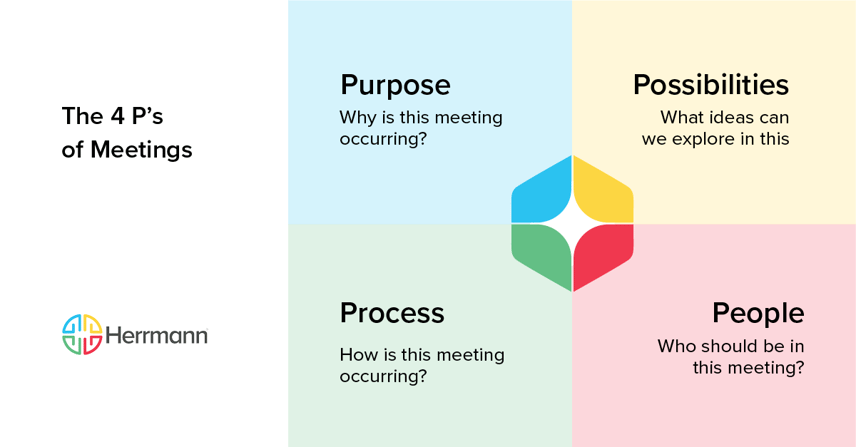
Effective virtual meetings are achieved by aligning digital interactions with how the human brain actually processes information. Meeting fatigue is more than a scheduling conflict; it is a strategic mismatch between a team's collective thinking habits and the complexity of their tasks. To lead truly productive virtual sessions, organizations must move beyond "camera-on" policies and adopt a cognitive operating system—such as the Whole Brain® Thinking framework—to ensure every meeting addresses the four critical frequencies of team performance: Purpose, Process, People, and Possibilities.
What Causes Virtual Meeting Fatigue?
Meeting fatigue is the cognitive exhaustion resulting from excessive, poorly structured, or unnecessary digital interactions. According to research, virtual fatigue affects 95% of employees and is driven by these six organizational "cost" factors:
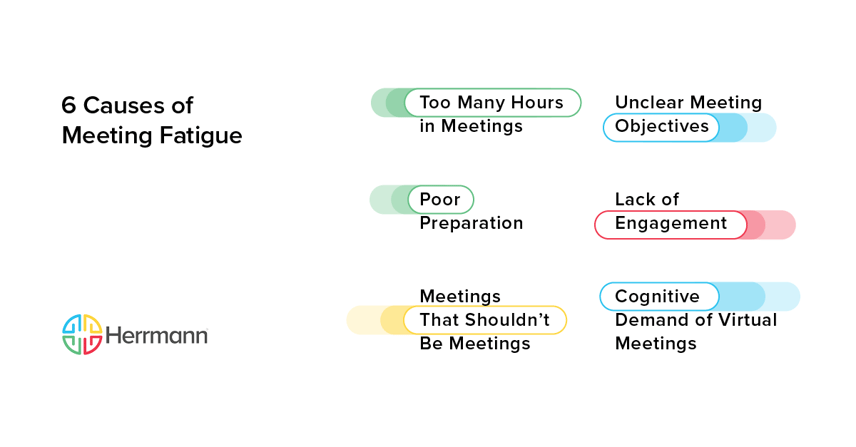
- Too Many Hours in Meetings: The accumulation of back-to-back sessions that prevents deep, "head-down" thinking and drains mental energy.
- Unclear Meeting Objectives: Wasting cognitive energy on irrelevant topics because a meeting lacks a clear purpose, decision point, or ROI.
- Poor Preparation: Disruption and frustration caused by organizers or participants failing to review materials or set logistics in advance.
- Lack of Engagement: Disconnection that occurs when participants feel their unique cognitive strengths are not being utilized or that their voices don't matter.
- Meetings That Shouldn’t Be Meetings: Unnecessary gatherings for status updates or simple announcements that could be handled more efficiently via asynchronous channels.
- Cognitive Demand of Virtual Meetings: The high-intensity effort required to interpret non-verbal cues and facial expressions on small, laptop-sized screens.
Practical Strategies to Prevent and Reduce Meeting Fatigue
The good news is that by following some practical strategies, you can reduce or prevent fatigue. These steps protect your team's cognitive bandwidth and improve organizational learning:
Set an Agenda
The meeting organizer should send out an agenda before each meeting, whether in a separate communication or attached to the invite. This agenda should have specific topics of discussion and will often mention the decisions to be made. This information helps invited participants understand what will be discussed so they can prepare — or decline to attend if the topic isn’t relevant.
Leverage Technology
Regularly assess whether your technology facilitates best practices for remote team meetings rather than making them more complicated. Make sure every employee has the right hardware setup to effectively participate. Take advantage of virtual assistants that will automatically record and summarize meetings. This creates a record for anyone who needs to check what was discussed, even if they couldn’t attend live.
Encourage Feedback
Leaders don’t always know when a meeting has become a waste of time. They need a team culture where feedback is welcomed — even when it’s hard to hear. The only way to get such honest feedback is to build a psychologically safe workplace where people’s differences are embraced. As a leader, make sure you explain how you respond to feedback and what changes will result.
Allow for Breaks During Long Meetings
A long meeting without stoppages will cause frustration and contribute to rushed or ill-tempered decision-making. Consider a 15-minute break every 60 to 90 minutes so people can stretch, use the restroom, or simply reflect. These breaks aren’t lost productivity; they help people replenish themselves and return to the meeting with renewed focus.
Make Meetings Harder to Schedule
Scrutinize meetings as a cost that must be justified. Consider collaborative brainstorming with Whole Brain® Thinking to determine if the session is necessary. Audit your existing meetings every 90 days to see what’s truly necessary and what could be communicated via email, group chat, or a shared document.
How Whole Brain® Thinking Improves Team Meetings
Meetings are effective when they have a clear purpose and embrace the different perspectives within your team. A team with cognitive differences contributes more because of their varied backgrounds and thought processes. One of the best ways to build these differences is to implement the Whole Brain® Thinking methodology, starting with the Herrmann Brain Dominance Instrument® (HBDI®) assessment.
The HBDI® identifies your team’s preferred thinking processes, allowing you to understand "who needs what" to stay engaged. When you apply Whole Brain® Thinking, you can use the 4 P’s framework to audit your interactions:
- Purpose (Analytical/Blue): Does the meeting have clear objectives, decision points, or intended outcomes? Analytical thinkers need logic and quantitative ROI to feel their time is well-spent.
- Process (Practical/Green): Predictability reduces anxiety. Ensure meetings start and end on time with a clear sequence. Use a meeting decision tree (included in our engagement tips) to determine if a gathering is required.
- People (Relational/Red): Are the right people in the room? Relational thinkers are attentive to inclusion. Proactively manage the user experience for remote attendees to ensure they aren't inadvertently sidelined by "in-room" side conversations.
- Possibilities (Experimental/Yellow): Is there space for hope and imagination? Unlock your Experimental thinkers to explore potential improvements and disruptive outcomes, turning a status update into an innovation lab.
Put Energy Back Into Your Meetings Unproductive meetings are a symptom of unmapped cognitive gaps. Get our free toolkit to create team meetings that work and learn how to apply the Whole Brain® methodology to your unique organizational challenges.

Share