
Unlock a Thinkers HBDI® results
-
Login to the Thinker Portal
-
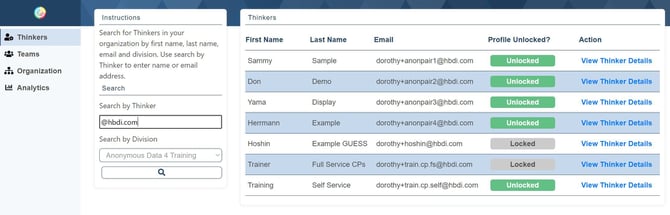
Go to Thinkers and search by name or email.
-
In results, click View Thinker Details.
-
Check status. If Locked, click Unlock and confirm.
-
(Optional) Notify the Thinker that results are now available in My HBDI® Results.
If you’re stuck: Verify the correct person/division; contact Herrmann Support if the unlock button isn’t available.
Related Articles:
- Herrmann Platform: self-service tools
- Send a Thinker a password reset
- Change a Thinker’s division
- Create a Team
- Edit a Team
- Request changes to org structure
- Run organizational analytics
- Request SSO setup
Need help? Please submit a ticket.