
Run organizational analytics for organization wide reporting:
-
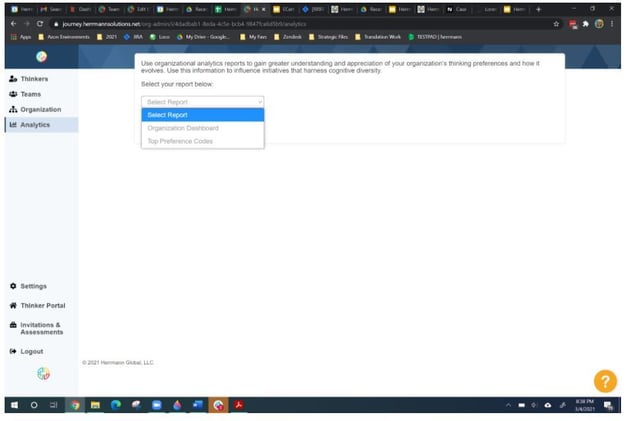
Login to the Thinker Portal and go to Analytics on the left sidebar.
-
Select the division(s) and date range (if applicable).
-
Run the Organizational Dashboard and/or Top Preference Codes reports.
-
(Optional) Capture screenshots of charts for slide decks.
Reporting Options:
Most organizations want to provide reports for the overall data of the organization and often reports by Divisions. There are two reporting options available.
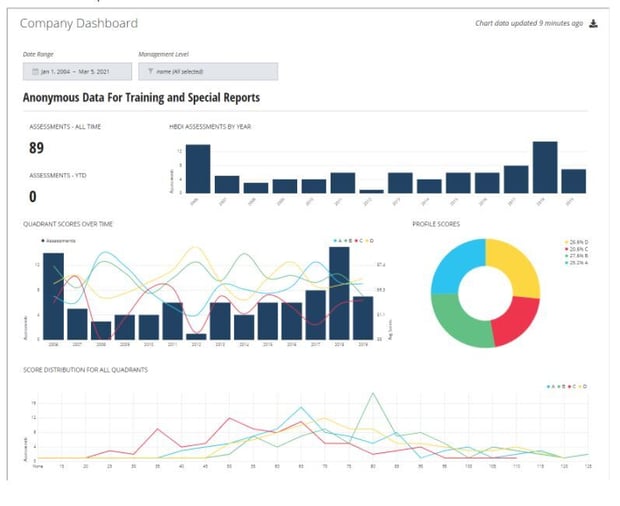
Organizational Dashboard: This report provides an overview of your organization's thinking preferences over a period of time.
Included in this report:
-
- Number of assessments included in the report
- Number of assessments in the current year
- Number of assessments included per year
- Cumulative assessments per year
- Average score in each quadrant per year
- Profile composite
- Score distribution for all quadrants
- Descriptive statistics
Top Preference Codes
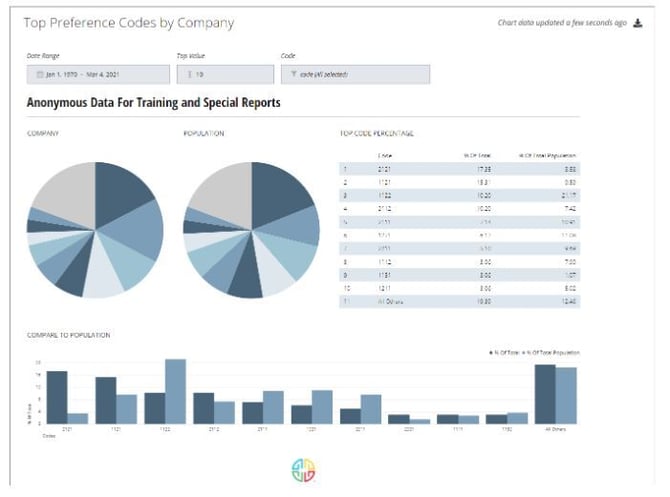
This report summarizes the top preference codes in your organization.
Included in this report:
-
- Top 5 - 15 preference codes in your organization (chart and list)
- Top 5 - 15 preference codes in the Herrmann database
- Comparison of top preference codes between your organization and general population
Related Articles:
- Herrmann Platform: self-service tools
- Unlock a Thinker’s HBDI® results
- Send a Thinker a password reset
- Change a Thinker’s division
- Create a Team
- Edit a Team
- Request changes to org structure
- Request SSO setup
Need help? Please submit a ticket.