
As a Certified Practitioner or account administrator, you have visibility into the HBDI® profile
data for the thinkers in your organisation. This article explains why granular sharing controls
exist, what each sharing status means, and how to identify a thinker’s current sharing
preference so you can support them effectively.
IMPORTANT: Planning a session using the Teams feature? If you intend to use the Teams feature to debrief with your group, all thinkers in the team will need to have their sharing set to Sharing or Limited Sharing, before the session (instructions below). If you need to prepare ahead of thinkers updating their sharing preferences, generate a Team Report instead, which does not require thinkers to have sharing enabled.
Why Sharing Permissions Matter
The sharing permissions feature is not just a convenience, it is a foundational part of how Herrmann upholds its commitment to data privacy and meets its obligations under global privacy regulations, HBDI® profile data is personal data, and individuals have the right to control who can access it.
This granular, consent-based approach to sharing is designed to support compliance with: GDPR, CCPA and broader privacy best practices.
By allowing each thinker to set their own sharing preference, Herrmann ensures that profile data is never shared without the individual's active consent. As a Certified Practitioner, understanding these permissions helps you respect thinker autonomy, handle data responsibly, and confidently answer questions about privacy.
Important: Regardless of a thinker's sharing setting, you and other Certified Practitioners in your organisation always retain access to profile data. Sharing permissions govern visibility for other thinkers and Thinking Groups only.
Understanding Sharing Statuses
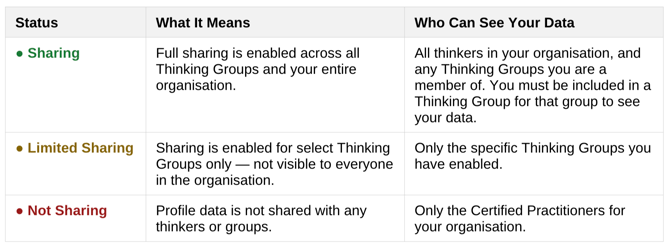
There are three sharing statuses a thinker may have. The data can be shared is always limited to the thinker's profile scores, preference code, and profile kite.
How to Check a Thinker's Sharing Status
You can view a thinker's sharing status in three places: on the invitation, assessment group, or thinkers pages. All are accessible from the same starting point.
-
Navigate to https://auth-st.herrmannsolutions.net/signin and login to your account.
-
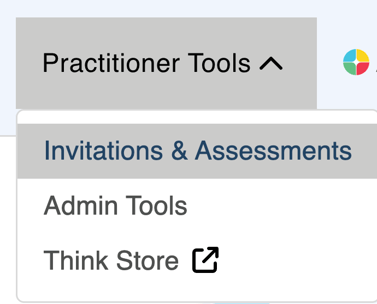
In the top navigation bar, click Practitioner Tools, then select Invitations & Assessments from the dropdown.
-
On the Axon Homepage, select Search For, then choose Invitations, Thinker, and/or Assessment Groups depending on what you need to check.
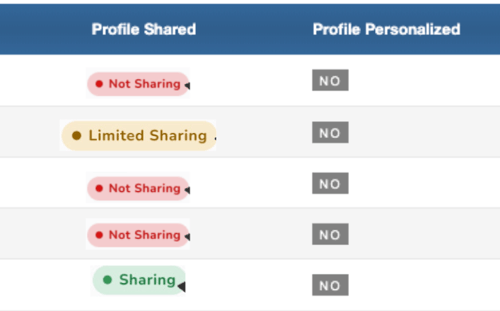
- Search for the invitation or assessment group in question, click View and locate the Profile Shared column to see the thinker's sharing status.
- Search for the thinker(s) as necessary and look at the Profile Shared column.
Helping Thinkers Manage Their Sharing Permissions
If a thinker reaches out with questions about their sharing settings or wants help updating their preferences, direct them to the thinker-facing knowledge base article:
Related article: Managing Your HBDI® Profile Sharing Permissions, step-by-step instructions for thinkers on how to view and update their own sharing preferences.
You can also walk a thinker through the process directly. Thinkers manage their permissions by:
-
Navigate to https://auth-st.herrmannsolutions.net/signin and login to your account.
-
Clicking their profile icon in the upper right corner and selecting Sharing Permissions.
-
Using the toggles to adjust sharing for their organisation or individual Thinking Groups.
Thinkers may update their sharing preferences at any time. There is no minimum or maximum sharing requirement.