
What is the Signals Survey?
The Signals Survey is part of the Team Accelerator Tools available in the Herrmann Thinker Portal. It asks each team member a short set of questions about how well the team is handling its day-to-day work, then rolls the responses up into the team's Signals tab — giving the team a repeatable way to check in on effectiveness, not just a one-time snapshot.
Where to Find It
- From the Thinker Portal homepage, scroll to the bottom half of the page to see any groups/teams you belong to. Click on a team to open it.
- You'll land on the Group/Team Summary page. Near the top, you'll see tabs for Insights, Signals, and Accelerator Tools.
ℹ️ Note: Don't see these tabs? Team Accelerator Tools may not be enabled for this team — please submit a support request for help. - The Signals tab shows your team's results once at least one member has completed the survey.
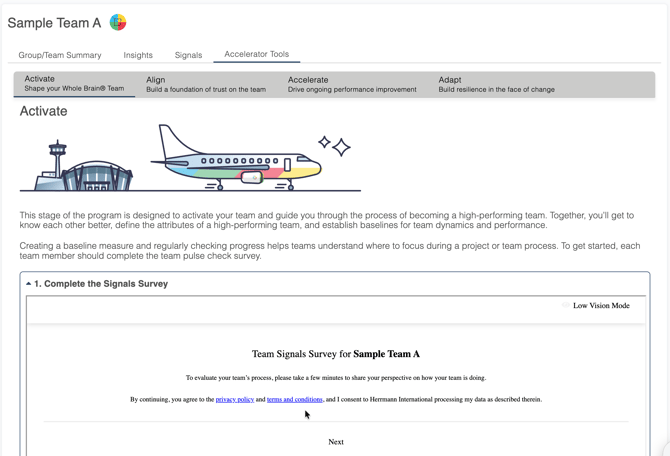
- To take the survey for the first time, go to the Accelerator Tools tab instead. You'll land on Activate ("Shape your Whole Brain® Team"), which walks your team through getting to know each other and establishing a baseline for team dynamics and performance. Expand Section 1: Complete the Signals Survey and click Next to begin.
Taking the Survey
- Your first response sets the team's baseline. Taking the survey again on a regular basis lets the team track progress over time and work toward becoming a high-performing team.
- Question 1 asks how long you've been a team.
- Question 2 asks you to rate the team's current overall effectiveness.
- The remaining 16 questions ask how often the team effectively handles specific tasks, using a scale of Rarely, Occasionally, Frequently, or Consistently.
- Click Submit to complete the survey.
What Happens With the Results
- Results roll up into the team's Signals tab as team-level data — individual responses aren't labeled with who answered what.
- The team can review how responses trend across survey periods over time.
- The tab also surfaces suggested actions based on the team's responses, pointing to specific ways to improve effectiveness.
Why Use It
Where the Team Effectiveness Dashboard offers a deeper, practitioner-led diagnostic, the Signals Survey gives teams a lightweight, self-guided way to stay checked in on how they're working together — right inside the flow of the Team Accelerator Tools.
Related Articles:
- What are Team Accelerator Tools on the Thinker Portal?
- Improve Team Alignment with the Herrmann Team Effectiveness Dashboard
Need help? Please submit a ticket.