
Your HBDI® profile contains your thinking preference data — including your profile scores, preference code, and profile kite. You control who has visibility into this data through the Sharing Permissions settings in your Herrmann account.
Understanding Sharing Statuses
There are three levels of sharing for your HBDI® profile data:
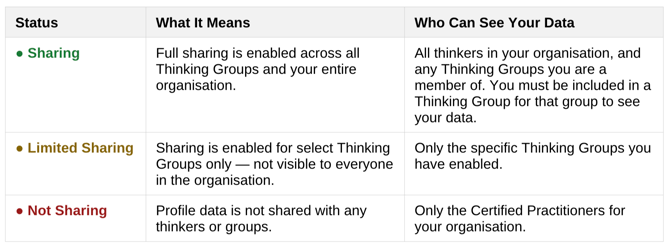
Note: Regardless of the sharing level you choose, the data that may become visible is always limited to your profile scores, preference code, and profile kite.
How to Access Sharing Permissions
-
Navigate to https://auth-st.herrmannsolutions.net/signin and login to your account.
-
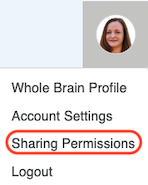
In the upper right hand corner, click the circle icon showing your photo or initials.
- Select Sharing Permissions from the drop down menu
Managing Your Sharing Settings
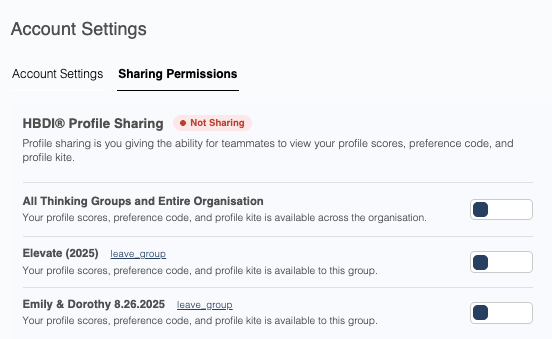
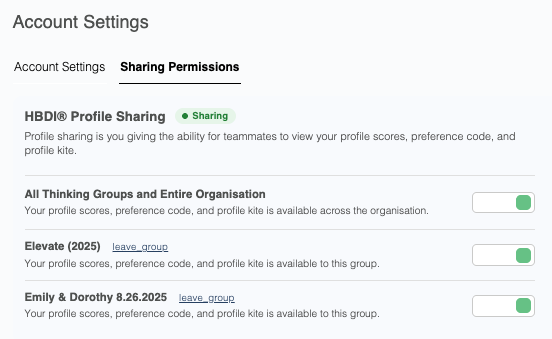
Once on the Sharing Permissions page, you will see toggle controls for your organisation and any Thinking Groups you belong to. Use these toggles to customize your sharing level.
Not Sharing
When all toggles are turned off, your status shows as ● Not Sharing. Your profile data is not visible to any thinkers or Thinking Groups in your organisation. Only your organisation’s Certified Practitioners retain access.
Limited Sharing
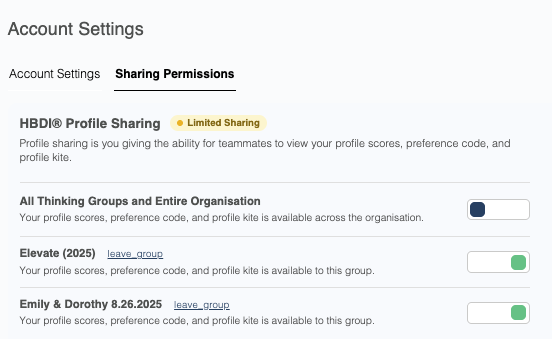
When at least one Thinking Group toggle is on but the All Thinking Groups and Entire Organisation toggle remains off, your status shows as ● Limited Sharing. Your profile data is visible only to the specific groups you have enabled.
Sharing
When the All Thinking Groups and Entire Organisation toggle is turned on, your status shows as ● Sharing. Your profile data is visible to all thinkers across your organisation.
Frequently Asked Questions
Who can always see my profile data, regardless of my sharing settings?
Your organisation’s Certified Practitioners always have access to your HBDI® profile data, regardless of your sharing permissions. These settings only affect visibility for other thinkers and Thinking Groups.
Can I share with some groups but not others?
Yes. Use the individual group toggles to turn sharing on or off for each Thinking Group independently. This will place your account in Limited Sharing status.
What does the “leave_group” link do?
Each group listing includes a leave_group link next to the group name. Clicking this removes you from that group entirely, independent of your sharing toggle settings.
Does sharing my profile affect what I can see?
No. Your sharing settings only control what others can see about you. They do not affect your own access to your profile data or to other thinkers’ profiles.